Showing posts with label teaching. Show all posts

Thursday, 3 March 2011

Keyboard I/O hack

During my research visit at Microsoft Research in Cambridge with Steve Hodges group I spend a lot of time building things and programming (Windows Phone 7, C#, microcontroller...) - which I really enjoyed!

In this post I want to share a mini project, I did together with Nic Villar between two coffees … it reminded me somehow of the Friday afternoon projects (=2h projects you do because they are fun and sometimes you learn something) while I did my PhD.

Perhaps some context first: working on Microsoft .NET Gadegteer we discussed many ideas of how to ease code/system creation for physical and embedded computing. Looking into it I came across a number of interesting approaches for software development that runs in the browser. Examples include: http://ideone.com/ (a online compiler for a large number of languages), http://wonderfl.net/ is a online development environment for Flash that allows to build on other people's code by forking their project, and http://mbed.org/ is a online tool for rapid prototyping of a microcontroller system.

Now to the mini project: a keyboard hack that supports input as well as output. You find many example of keyboard hacks on the web - basically you take out the PCB of the keyboard an replace the keys with something more interesting… here is ours that supports input (which is common) as well as output - from the computer (or web browser) to the environment. Using AQW210EH allows more flexibility in what you drive and what you create the inputs with. The attractive thing in using a keyboard is that it will work without a driver - you just plug it in and it works.

To control it I wrote a java applet and some JavaScript code. Basically the java-applet is controlling the Scroll-Lock LED and from the website this is called via JavaScript (try here if it works on your computer - if it works your CAPS, NUM, and SCROLL LED will blink once the web page is open). I tried it on some Windows machines and it worked well - the java applet seems not to work on a Mac (so you probably have to find another way to set you Scroll Lock LED programmatically). You can extend the output to CAPSLOCK and NUMLOCK - but these are sometimes used - in contrast to the SCROLL LOCK. Input is simple - by connecting one of the rows to one of the colloms you generate a letter comes in as if you would type it. The nice thing with USB is that you can have multiple keyboards connected at the same time (however the LEDs are synchronized between them).

In C# you can use the SendKeys.Send("{SCROLLLOCK}") command (for details see: http://msdn.microsoft.com/en-us/library/system.windows.forms.sendkeys.send.aspx,
http://support.microsoft.com/Default.aspx?id=177674) The SendKeys.Send may only give an pulse to the LED and hence you may need to call a system function.

Using a JavaApplet it looks like this.

import java.applet.*;
import java.awt.*;
import java.awt.Toolkit;
import java.awt.event.KeyEvent;
public class keyLed extends Applet {
Font f = new Font("TimesRoman",Font.BOLD,20);
String strMessage;
Toolkit tk = Toolkit.getDefaultToolkit();
public void init() {
setBackground(Color.white);
setStrMessage("Applet loaded.");
}
public void paint(Graphics g) {
g.setFont(f);
g.drawString(this.strMessage, 100 , 25);
}
public void ScrollLedOn() {
tk.setLockingKeyState(KeyEvent.VK_SCROLL_LOCK,true);
setStrMessage("Scroll on");
}
public void ScrollLedOff() {
tk.setLockingKeyState(KeyEvent.VK_SCROLL_LOCK,false);
setStrMessage("Scroll off");
}
}


And in HTML/JavaScript you call it:
<APPLET CODEBASE="." CODE="keyLed.class" WIDTH=300 HEIGHT=50 NAME="keyLedApplet">
</APPLET>
<script language="JavaScript" type="text/javascript"> 
function LEDOn()
{
document.keyLedApplet.ScrollLedOn();
}
 
function LEDOff()
{
document.keyLedApplet.ScrollLedOff();
}
 </script>

Saturday, 5 February 2011

Tangible User Interface - Understandable, Ergonomic, Aesthetic

As I am always on the lookout for user interfaces it was delightful to see the bridge and the engine room of the Queen Mary with truly tangible man-machine-interfaces. Large wheels and all sorts of knobs, cranks, and levers are there to operate the many functions. At a first glance they look nice, intuitive, and easy to use - but are they? Looking closer it becomes clear that many user interface elements were built primarily to enable mechanical control and not because of ergonomic considerations. The size of physical controls (e.g. the length of a lever) is often due to the fact that certain forces must be created to control the machine. The size and visibility of the mechanical properties are helpful for the user to understand the operation and to some extent foresee the impact of the operation. At the same time many of these user interface elements make the operation very visible to co-workers - you do not have to tell that you change the speed as everyone around you can clearly see it from your actions. It seems that ergonomic properties are of lesser importance in many of these controls, e.g. some controls require strong forces or large physical movements. All in all I would conclude that these tangible controls (that are designed due to physical constraints) are helping with the understandability of a user interface but are not necessarily a good model for creating ergonomic controls.


In some recent examples of tangible user interfaces I feel that people took the worst from both worlds - they argue for the physical controls - and all they get are less ergonomic UIs (e.g. needs more forces, movements, etc.) which are less understandable as the physical constraints do not map to the constraints of the digital system… Hence I think it is important to keep this in mind: the physicality of the controls should be used to make interaction understandable and the design should not compromise ergonomics (as we do not live in the mechanic era anymore).

One further thing that can be learned for these mechanical interfaces is the beauty of the design and implementation. Some are in shinny and polished metal, others are nicely decorated, and on others it is just pleasant to touch the wood. Beauty and esthetical qualities play a major role - and we know this for screen based UIs from Noam Tractinsky's work [1,2] as well as from the market success of devices like the iPhone.

[1] Noam Tractinsky. 1997. Aesthetics and apparent usability: empirically assessing cultural and methodological issues. In Proceedings of the SIGCHI conference on Human factors in computing systems (CHI '97), Steven Pemberton (Ed.). ACM, New York, NY, USA, 115-122. DOI=10.1145/258549.258626 http://doi.acm.org/10.1145/258549.258626

[2] Tractinsky, N., Shoval-Katz A. and Ikar, D. (2000) What is Beautiful is Usable. Interacting with Computers, 13(2): 127-145.

Monday, 20 September 2010

Interviewing with Rikke Friis Dam and Mads Søgaard

Rikke Friis Dam and Mads Søgaard are currently working on a re-launch of the website interaction-design.org. The side has over the last years involved in a useful resource for researchers and practitioners in human computer interaction and interaction design. There is a very comprehensive calendar that includes most relevant events in HCI.


With their current work Rikke and Mads pursue a mission to create a new and free resource for teaching and learning interaction design and HCI. In a first step they work with researchers (like myself) around the world that are experts on a certain topic (in my case context-awareness and implicit interaction) to create new teaching materials. This includes a chapter (about 3000 words) that has tutorial character and interviews in which specific topics are discussed in more details.

It was great fun to work with them and I look forward to seeing the new material online.

Friday, 23 July 2010

Teaching Ubicomp? What is it we should teach?

Why should we teach Ubicomp? What are the core issues when teaching Ubicomp? How do we cope with the rapid changes in technologies if we provide practical exercises in our Pervasive Computing classes? What skills will students take away from the course?

As Ubicomp is still a young and dynamic subject it is inevitable that we have to ask these questions. To share our experiences in teaching we met at the ETH Zürich. Friedemann Mattern, Marc Langheinrich, Michael Rohs, Kay Römer, and many of our PhD students (and me ;-) spent two days in Zürich to collect materials and discuss the above questions. The hardest one is obviously the what is ubicomp question…

For me the key thing is that we teach about distributed computing systems that are aware and linked to the real world and which are used by humans. The systems aspect is key and I think which specific technologies, tools, methods, we teach are exchangeable. The second point I want to make in my pervasive computing class is to get students excited and aware of the potential of computing in the future and how we are at the heart of a major change that goes beyond technology.

We are currently compiling a Wiki with teaching materials which we hope will become public in the future (at least in parts). If you teach a ubicomp related course or if you know of course please feel free to add a comment with link to the webpage and we will try to include it in the collection.

PS: examples of the UI challenge of ubicomp are everywhere.

Saturday, 10 April 2010

Example for explaining affordance

Having used these cups I found that they are great examples for the concept of an affordance. Their shape and design prohibits some usage scenarios ;-) E.g. try to fill it and put it somewhere…

Friday, 26 February 2010

Doctoral colloquium in Tampere

For the second time we organized an international doctoral colloquium on HCI - mainly with students from Germany and Finland. This year it was hosted at the University of Tampere. 10 students in different stages of their PhD presented their work and ideas. The first one was in Oulu.

Besides many scientific and technological topics we discussed the process of doing a PhD. I shared my experience of doing a PhD based on an extened version of Jakob Badram's fish model as well as with the PI-presentation model.

The fish: basically you start with a topic and it widens over time - till at some point you have to focus - and when you have focused and found the specific contribution you have to widen again a bit to cover the things you need for making it a coherent PhD-thesis. This applies to the technical skill set of the student as well as to the research topic. Pertti added a personal sanity graph - from the beginning when you think of how difficult a PhD is, to the middle were you think you know it all and everyone else in the research community has no clue, to the (hopefully) final stage where you get a objective view on your PhD (where you realize you made a contribution you can be proud of - but it is probably not going to change the whole world). It seemed that most people who have done a PhD in CS can relate to this graph…

Sunday, 21 February 2010

Why do we need to teach children binary coding?

I am very much in favor of teaching children more than one number system (e.g. binary additional to the decimal system). To me this gives children a better understanding of the nature of numbers - I know that this seems not to be widely shared ;-)


Now I found a further reason why it essential to know binary codes - How else would you decode this best before date on this chocolate bar if you would not know it!

Thursday, 21 January 2010

Book chapter on Teaching Beyond the Classroom

Kati Mäkitalo-Siegl, Jan Zottmann, Frederic Kaplan and Frank Fischer organized a workshop that resulted in the book: Classroom of the Future. The book gives a very good overview and is in my view very well suited to run a seminar

We have one chapter in the book that talks about teaching beyond the classroom and outside a typical classroom using pervasive computing technologies [1]. Our chapter includes some of the work on tangible interaction we did in Munich, e.g. [2] and earlier experience where we did a school garden blog (in German only http://www.hcilab.org/albrecht/flachs-web/).

Details about the book and a free preview are available at the publisher's side. The free preview includes an article on the classroom of the past - which I found quite interesting. If you are interested in our article, drop me a mail and I may find the draft.

[1] Paul Holleis, Albrecht Schmidt, Heiko Drewes, Richard Atterer, Petra Dollinger. Teaching Beyond the Classroom: Pervasive Computing Technologies for the Classroom of the Future. Classroom of the future. SensePublisher 2010, pp 63-85. ISBN:978-9460911026 (book at amazon)

[2] Terrenghi, L., Kranz, M., Holleis, P., and Schmidt, A. 2006. A cube to learn: a tangible user interface for the design of a learning appliance. Personal Ubiquitous Comput. 10, 2-3 (Jan. 2006), 153-158. DOI= http://dx.doi.org/10.1007/s00779-005-0025-8

Wednesday, 14 October 2009

Finishing my term as External Examiner at Trinity College Dublin

Over the last three years I have been regularly to Dublin to act as external examiner for the Ubicomp MSc course. For me this was a good experience to see how serious The School of Computing at Trinity College takes external quality control and how well processes are managed. And besides the administrative part I saw a great many interesting MSc dissertations over the years. Even though the term has come to an end I hope to travel to Dublin in the future too - perhaps on Holiday to see more of the city (which I did not really manage …)

PS: recession seems to have hit Ireland - I have never seen such short queue in Dublin airport - and it is definatly not the selfservice machines that reduced the queue ...

Saturday, 5 September 2009

Students generate interesting ideas, links to photos

In the final part of the summer school the students worked in groups to create new ideas for displays and their use. We had 5 groups working hard - all creating amazing results for such a short time. Sometimes I wonder how we could better utilize this design exercise as the results were really exciting.

On group looked into the concept of mobile and contextual displays on garments - the idea T-SHARE assesses potential applications, when having networked displays included in T-Shirts (see the group presentation for details). This moves an idea with have investigated over the last year to a new level. I am really thrilled and I think we should really look how to setup a larger project on this topic.

We worked hard :-) but in the time between we enjoyed our trip - here are the photos I took (Bahai Garden, climbing with Keith and Antonio, the trip to Jerusalem, School and Beach in Haifa).

[1] Florian Alt, Albrecht Schmidt, Christoph Evers: Mobile Contextual Displays. In: Pervasive Advertising Workshop @ Pervasive 2009. Nara, Japan 2009.

Saturday, 8 August 2009

Reading material for summer school.

Tsvi Kuflik and Antonio Krüger organize from August 30th - September 3rd a German-Israeli Minerva School for Ubiquitous Display Environments: Intelligent Group Interaction, Foundations and Implementation of Pervasive Multimodal Interfaces. I will teach a session on: "Embedded interaction with display environments" and here is the list of recommended readings for the participants - if you are short on time only read the first one and glance over the other two.

Mahato, H., Kern, D., Holleis, P., and Schmidt, A. 2008. Implicit personalization of public environments using bluetooth. In CHI '08 Extended Abstracts on Human Factors in Computing Systems (Florence, Italy, April 05 - 10, 2008). CHI '08. ACM, New York, NY, 3093-3098. DOI= http://doi.acm.org/10.1145/1358628.1358813 (if you do not have access to ACM here is a copy on the web)

Schmidt, A.; van Laerhoven, K. 2001. How to build smart appliances? Personal Communications, IEEE. Volume 8, Issue 4, Aug 2001:66 - 71. DOI: 10.1109/98.944006. http://ieeexplore.ieee.org/xpl/freeabs_all.jsp?arnumber=944006 (if you do not have access to IEEE here is a copy on the web)

Villar N.; Schmidt A.; Kortuem G.; Gellersen H.-W. 2003. Interacting with proactive public displays. Computers and Graphics, Elsevier. Volume 27, Number 6, December 2003 , pp. 849-857(9). Draft Version "Interacting with proactive community displays" online available.

Wednesday, 1 July 2009

DIY Segway - to motivate embedded programming?

Elektor magazine features in the current issue a DIY Segway called Elektor Wheelie. The system is build around a ATMEGA32 and has obviously a lot of mechanics. For sensing an ADXL320 (acceleration sensor) and an IDG-300 (gyro) are used. Looks like a fun project - and you have full access to the software (not sure what you really would program differently, perhaps one can tune it to get faster ;-)

Perhaps it could be a platform to motive embedded programming - with clear real-time constraints, as it hurts if you fall off… Next term we are teaching digital system design and programming of microcontroller systems - should we get one for the lab? Someone willing to built it?

Friday, 26 June 2009

Making Computer Science Exciting for Children - Kinderuniversität

Petra is teaching at the primary school in Satteldorf. As there is no University close by we decided to have a university afternoon at school. The idea behind this (in German Kinderuniversität) is to get young children excited for scientific topics and show that research is fun. The lecture should make them curious and motivate them to ask fundamental questions.

My lecture was on principles and technologies for communication (in German) and we looked fundamentally at what information is, how it relates to probabilities, how to encode information, and what devices people used and use for communication. For me this was a very exciting experience and also showed that we (as a discipline Computer Science) should probably look more into didactic and how to communicate fundamentals of our subject in school. So far many students associated computer science with using PowerPoint :-( but there are interesting starting points, e.g. a German book on algorithms for school children [1].

[1] Vöcking, B.; Alt, H.; Dietzfelbinger, M.; Reischuk, R.; Scheideler, C.; Vollmer, H.; Wagner, D. (Ed.). Taschenbuch der Algorithmen. 2008, ISBN: 978-3-540-76393-2

Thursday, 25 June 2009

Linking the activities in the physical world to actions in the digital/virtual

Currently we have an assignment in our Pervasive Computing class that asks students to design and develop a system where actions are associated with artifacts. Technically students should develop a web based solution using RFID. Apropos RFID, … if you look for a good introduction on RFID read Roy Want's IEEE Pervasive Magazin paper [1].

We use the hardware from http://nabaztag.com/ (Ztamp:s and Mir:ror) as the focus is on the concept and application and not on the underlying technology. To ease development Florian and Ali have developed a little system that offers WebCallBacks (students can register a URL and that is called when a tag is read).

Linking by tagging of objects has been well explored, e.g. [2] and [3], and I think it is about time that this technologies will make an impact in the consumer market - the technology gets cheap enough now (and perhaps one of our students has a great idea).

Some years back (in the last millennium) a company tried to push linking of paper adverts and digital content with the CueCat (http://en.wikipedia.org/wiki/CueCat) - I was impressed and inspired at that time but in my view it had two major weaknesses: (1) technically too early and (2) encoding of serial numbers instead of URLs. The RadioShack catalog and the Wired Magazine that included codes showed the potential - but it was too cumbersome as it was restricted to the PC …

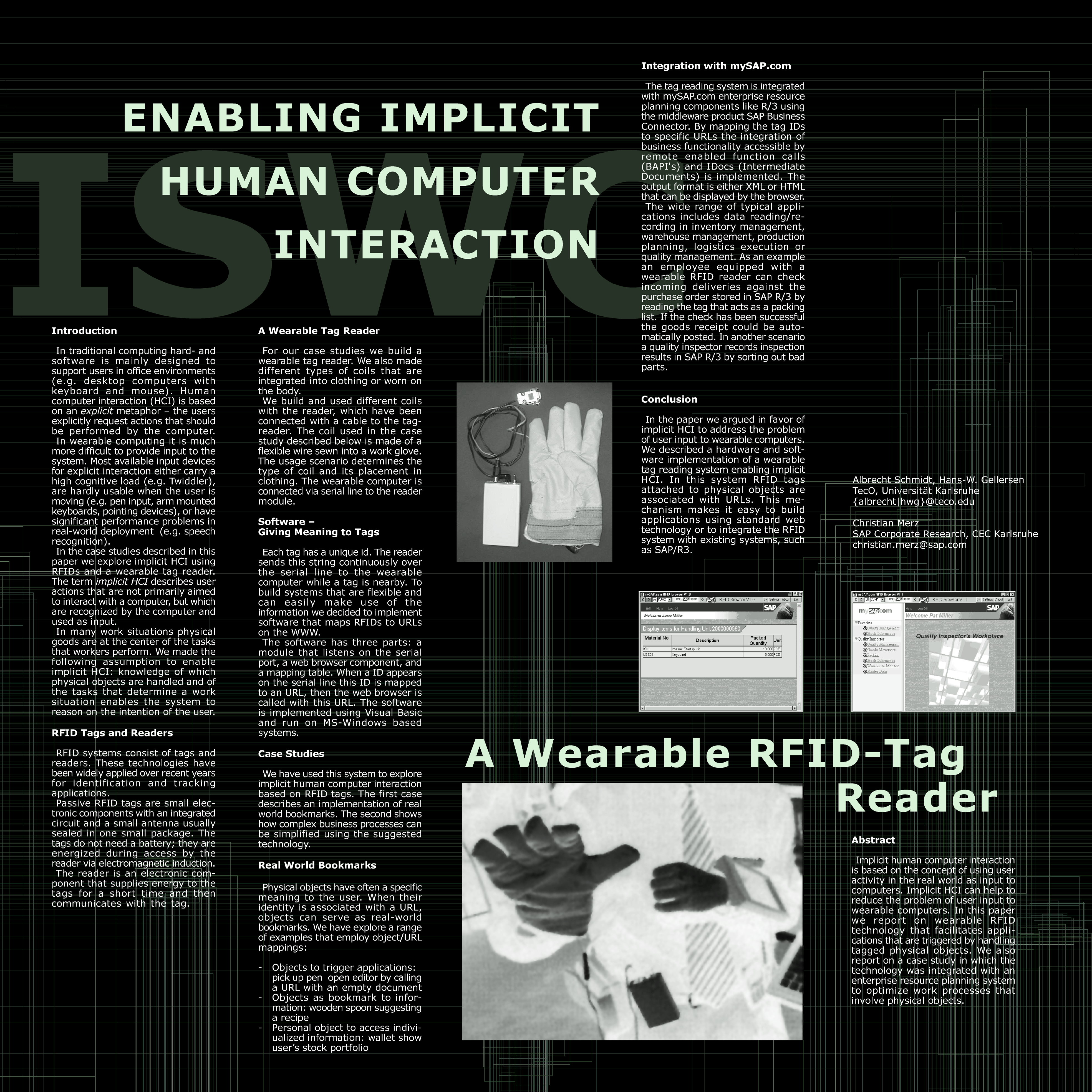
We did some work on the topic, too around that time - at RFID reader integrated in a glove - which resulted in a Poster at ISWC [4] and a patent [5].

[1] Want, R. 2006. An Introduction to RFID Technology. IEEE Pervasive Computing 5, 1 (Jan. 2006), 25. DOI= http://dx.doi.org/10.1109/MPRV.2006.2

[2] Harrison, B. L., Fishkin, K. P., Gujar, A., Portnov, D., and Want, R. 1999. Bridging physical and virtual worlds with tagged documents, objects and locations. In CHI '99 Extended Abstracts on Human Factors in Computing Systems (Pittsburgh, Pennsylvania, May 15 - 20, 1999). CHI '99. ACM, New York, NY, 29-30. DOI= http://doi.acm.org/10.1145/632716.632738

[3] Ljungstrand, P. and Holmquist, L. E. 1999. WebStickers: using physical objects as WWW bookmarks. In CHI '99 Extended Abstracts on Human Factors in Computing Systems (Pittsburgh, Pennsylvania, May 15 - 20, 1999). CHI '99. ACM, New York, NY, 332-333. DOI= http://doi.acm.org/10.1145/632716.632916

[4] Schmidt, A., Gellersen, H., and Merz, C. 2000. Enabling Implicit Human Computer Interaction: A Wearable RFID-Tag Reader. In Proceedings of the 4th IEEE international Symposium on Wearable Computers (October 18 - 21, 2000). ISWC. IEEE Computer Society, Washington, DC, 193. (Poster as large PNG)

[5] US Patent 6614351 - Computerized system for automatically monitoring processing of objects. September 2, 2003. http://www.patentstorm.us/patents/6614351/description.html

Wednesday, 1 April 2009

Ubicomp Spring School in Nottingham - Tutorial

The ubicomp spring school in Nottingham had an interesting set of lectures and practical sessions, including a talk by Turing Award winner Robin Milner on a theoretical approach to ubicomp. When I arrived on Tuesday I had the chance to see Chris Baber's tutorial on wearable computing. He provided really good examples of wearable computing and its distinct qualities (also in relation to wearable use of mobile phones). One example that captures a lot about wearable computing is an adaptive bra. The bra one example of a class of interesting future garments. The basic idea is that these garments detects the activity and changes their properties accordingly. A different example in this class is a shirt/jacket/pullover/trouser that can change its insulation properties (e.g. by storing and releasing air) according to the external temperature and the users body temperature.

My tutorial was on user interface engineering and I discussed: what is different in creating ubicomp UIs compared to traditional user interfaces. I showed some trends (including technologies as well as a new view on privacy) that open the design space for new user interfaces. Furthermore we discussed the idea about creating magical experiences in the world and the dilemma of user creativity and user needs.

There were about 100 people the spring school from around the UK - it is really exciting how much research in ubicomp (and somehow in the tradition of equator) is going on in the UK.

Monday, 30 March 2009

Teaching, Technical Training Day at the EPO

Together with Rene Mayrhofer and Alexander De Luca I organized a technical training at the European Patent Office in Munich. In the lectures we made the attempt to give a broad overview of recent advanced in this domain - and preparing such a day one realizes how much there is to it…. We covered the following topic:
  • Merging the physical and digital (e.g. sentient computing and dual reality [1])
  • Interlinking the real world and the virtual world (e.g. Internet of things)
  • Interacting with your body (e.g. implants for interaction, brain computer interaction, eye gaze interaction)
  • Interaction beyond the desktop, in particular sensor based UIs, touch interaction, haptics, and Interactive surfaces
  • Device authentication with focus on spontaneity and ubicomp environments
  • User authentication focus on authentication in the public 
  • Location-Awareness and Location Privacy
Overall we covered probably more than 100 references - here are just a few nice ones to read: computing tiles as basic building blocks for smart environments [2], a bendable computer interface [3], a touch screen you can also touch on the back side [4], and ideas on phones as basis for people centric censing [5].

[1] Lifton, J., Feldmeier, M., Ono, Y., Lewis, C., and Paradiso, J. A. 2007. A platform for ubiquitous sensor deployment in occupational and domestic environments In Proceedings of the 6th Conference on international information Processing in Sensor Networks (Cambridge, Massachusetts, USA, April 25 - 27, 2007). IPSN '07. ACM, New York, NY, 119-127. DOI= http://doi.acm.org/10.1145/1236360.1236377

[2] Naohiko Kohtake, et al. u-Texture: Self-organizable Universal Panels for Creating Smart Surroundings. The 7th Int. Conference on Ubiquitous Computing (UbiComp2005), pp.19-38, Tokyo, September, 2005. http://www.ht.sfc.keio.ac.jp/u-texture/paper.html

[3] Schwesig, C., Poupyrev, I., and Mori, E. 2004. Gummi: a bendable computer. In Proceedings of the SIGCHI Conference on Human Factors in Computing Systems (Vienna, Austria, April 24 - 29, 2004). CHI '04. ACM, New York, NY, 263-270. DOI= http://doi.acm.org/10.1145/985692.985726 

[4] Wigdor, D., Forlines, C., Baudisch, P., Barnwell, J., and Shen, C. 2007. Lucid touch: a seethrough mobile device. InProceedings of the 20th Annual ACM Symposium on User interface Software and Technology (Newport, Rhode Island, USA, October 07 - 10, 2007). UIST '07. ACM, New York, NY, 269-278. DOI= http://doi.acm.org/10.1145/1294211.1294259 

[5] Campbell, A. T., Eisenman, S. B., Lane, N. D., Miluzzo, E., Peterson, R. A., Lu, H., Zheng, X., Musolesi, M., Fodor, K., and Ahn, G. 2008. The Rise of People-Centric Sensing. IEEE Internet Computing 12, 4 (Jul. 2008), 12-21. DOI= http://dx.doi.org/10.1109/MIC.2008.90  

Friday, 27 March 2009

Final Presentation: Advertising 2.0

Last term we ran an interdisciplinary project with our MSc students from computer science and business studies to explore new ways in outdoor advertising. The course was jointly organized by the chairs: Specification of Software Systems, Pervasive Computing and User Interface Engineering, and Marketing and Trade. We were in particular interested what you can do with mobile phones and public displays. It is always surprising how much a group of 10 motivated students can create in 3 months. The group we had this term was extraordinary - over the last weeks they regularly stayed in the evenings longer in the lab than me ;-)

The overall task was very open and the students created a concept and than implemented it - as a complete system including backend server, end user client on the mobile phone, and administration interface for advertisers. After the presentation and demos we really started thinking where we can deploy it and who the potential partners would be. The system offers means for implicit and explicit interaction, creates interest profiles, and allows to target adverts to groups with specific interest. Overall such technologies can make advertising more effective for companies (more precisely targeted adverts) and more pleasant for consumers (getting adverts that match personal areas of interest).

There are more photos of the presentation on the server.

PS: one small finding on the side - Bluetooth in its current form is a pain for interaction with public display... but luckily there are other options.

Sunday, 15 February 2009

Design Ideas and Demos at FH Potsdam

During the workshop last week in Potsdam we got to see demos from students of Design of Physical and Virtual Interfaces class taught by Reto Wettach and JennyLC Chowdhury. The students had to design a working prototype of an interactive system. As base technology most of them use the Arduino Board with some custom made extensions. For a set of pictures see my photo gallery and the photos on flickr. It would need pages to describe all of the projects so I picked few...

The project “Navel” (by Juan Avellanosa, Florian Schulz and Michael Härtel) is a belt with tactile output, similar to [1], [2] and [3]. The first idea along this lines that I have tried out was Gentle Guide [4] at mobile HCI 2003 – it seemed quite compelling. The student project proposed one novel application idea: to use it in sport. That is quite interesting and could complement ideas proposed in [5].

Vivien's favorite was the vibrating doormat; a system where a foot mat is constructed of three vibrating tiles that can be controlled and different vibration patters can be presented. It was built by Lionel Michel and he has several ideas what research questions this could address. I found especially the question if and how one can induce feelings and emotions with such a system. In the same application context (doormat) another prototype looked at emotions, too. If you stroke or pat this mat it comes out of its hiding place (Roll-o-mat by Bastian Schulz).

There were several projects on giving everyday objects more personality (e.g. a Talking Trashbin by Gerd-Hinnerk Winck) and making them emotional reactive (e.g. lights that reacted to proximity). Firefly (by Marc Tiedemann) is one example how reactiveness and motion that is hard to predict can lead to an interesting user experience. The movement appears really similar to a real firefly.

Embedding Information has been an important topic in our research over the last years [6] - the demos provided several interesting examples: a cable that visualized energy consumption and keyboard to leave messages. I learned a further example of an idea/patent application where information is included in the object – in this case in a tea bag. This is an extreme case but I think looking into the future (and assuming that we get sustainable and bio-degradable electronics) it indicates an interesting direction and pushing the idea of Information at your fingertip (Bill Gates Keynote in 1994) much further than originally intended.

For more photos see my photo gallery and the photos on flickr.

[1] Tsukada, K. and Yasumrua, M.: ActiveBelt: Belt-type Wearable Tactile Display for Directional Navigation, Proceedings of UbiComp2004, Springer LNCS3205, pp.384-399 (2004).

[2] Alois Ferscha et al. Vibro-Tactile Space-Awareness . Video Paper, adjunct proceedings of Ubicomp2008. Paper. Video.

[3] Heuten, W., Henze, N., Boll, S., and Pielot, M. 2008. Tactile wayfinder: a non-visual support system for wayfinding. In Proceedings of the 5th Nordic Conference on Human-Computer interaction: Building Bridges (Lund, Sweden, October 20 - 22, 2008). NordiCHI '08, vol. 358. ACM, New York, NY, 172-181. DOI= http://doi.acm.org/10.1145/1463160.1463179

[4] S.Bosman, B.Groenendaal, J.W.Findlater, T.Visser, M.de Graaf & P.Markopoulos . GentleGuide: An exploration of haptic output for indoors pedestrian guidance . Mobile HCI 2003.

[5] Mitchell Page, Andrew Vande Moere: Evaluating a Wearable Display Jersey for Augmenting Team Sports Awareness. Pervasive 2007. 91-108

[6] Albrecht Schmidt, Matthias Kranz, Paul Holleis. Embedded Information. UbiComp 2004, Workshop 'Ubiquitous Display Environments', September 2004

Friday, 6 February 2009

What happens if Design meets Pervasive Computing?

This morning I met with Claudius Lazzeroni, a colleague from Folkwang Hochschule (they were part of our University till two years ago).
 
They have different study programs in design and art related subjects. He showed me some projects (http://www.shapingthings.net/ - in German but lots of pictures that give you the idea). Many of the ideas and prototypes related to our work and I hope we get some joint projects going. I think it could be really exciting to have projects with design and computer science students - looking forward to this!

When I was in the UK we collaborated in the equator project with designers - mainly Bill Gaver and his group - and the results were really exciting [1]. We build a table that reacted to load changes on the surfaces and allowed you to fly virtually over the UK. The paper is worthwhile to read - if you are in a hurry have a look at the movie about it on youtube: http://www.youtube.com/watch?v=uRKOypmDDBM

There was a further project with a table -  a key table - and for this one there more funny (and less serious?) video on youtube: http://www.youtube.com/watch?v=y6e_R5q-Uf4

[1] Gaver, W. W., Bowers, J., Boucher, A., Gellerson, H., Pennington, S., Schmidt, A., Steed, A., Villars, N., and Walker, B. 2004. The drift table: designing for ludic engagement. In CHI '04 Extended Abstracts on Human Factors in Computing Systems (Vienna, Austria, April 24 - 29, 2004). CHI '04. ACM, New York, NY, 885-900. DOI= http://doi.acm.org/10.1145/985921.985947